2D Packing Problem using Genetic Algorithm
Introduction to 2D packing problem

Suppose you have a rectangular metal sheet and a set of shapes to cut from it. The goal is to arrange these shapes in a way that minimizes wastage. This is known as the 2D packing problem.
The problem of 2D packing occurs in various flavors, for example, a tailor arranging the layout of a design on a sheet of cloth, an RC enthusiast optimizing the layout on a of foam board to build a model airplane. In this article, we will study how to solve the 2D packing problem using genetic algorithm.
covers a sub-problem of no-fit polygon required to solve the 2d packing problem. describes the genetic algorithm approach to solving the 2d packing problem. covers an industry-grade, opensource nesting software, Deepnest, built using the approach described in this article.
No-fit polygon
Solving the 2D packing problem involves trying different placements of shapes on the sheet, adjusting their positions, and selecting the arrangement with the least unused space. A key challenge is ensuring that no shapes overlap during placement. To simplify, assume one shape is fixed at a certain location. The question then becomes: where can the next shape be placed so it does not overlap with the first? This is known as the no-fit polygon problem.
No-fit polygon for convex shapes
The paper shoemaking and the milk tray problem proved a result for the case of two convex polygons A and B. Let the two shapes be represented by their edges and a reference point. To obtain a no-fit polygon for two convex polygons, arrange the edges of A and -B in order of their slope.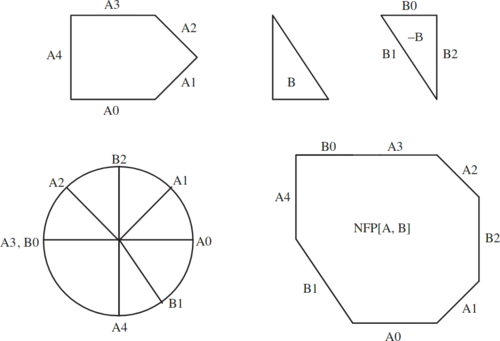
Algorithm: No-Fit Polygon for Two Convex Polygons
Input:
- Convex polygon \( A \) with vertices \( V_A = [a_1, a_2, \dots, a_m] \), ordered counter-clockwise (CCW).
- Convex polygon \( B \) with vertices \( V_B = [b_1, b_2, \dots, b_n] \), ordered CCW.
- Reference points \( r_A \in A \) and \( r_B \in B \).
Output:
Vertices \( V_{\text{NFP}} \) of the no-fit polygon (NFP) of \( A \) and \( B \).
-
Edge Vector Extraction:
Compute edge vectors for polygon \( A \)\[ E_A = [a_2 - a_1, a_3 - a_2, \dots, a_m - a_{m-1}, a_1 - a_m] \]Reverse \( V_B \) to maintain CCW after negation\[ V_{-B} = [b_n, b_{n-1}, \dots, b_1] \]Negate edge vectors of \( B \)\[ E_{-B} = [-(b_{n-1} - b_n), -(b_{n-2} - b_{n-1}), \dots, -(b_1 - b_2), -(b_n - b_1)] \] -
Merge and Sort Edges by Angle:
Let \( E = E_A \cup E_{-B} \). For each vector \( v = (x, y) \in E \), compute angle \( \theta = \text{atan2}(y, x) \). Sort \( E \) in increasing order of \( \theta \). -
Initialize No-Fit Polygon:
Reference point: \( p_0 = r_A - r_B \). Initialize vertex list: \( V_{\text{NFP}} \leftarrow [p_0] \) -
Construct the NFP Boundary:
Set \( p \leftarrow p_0 \). For each \( e \in E \): \( p \leftarrow p + e \) Append \( p \) to \( V_{\text{NFP}} \) -
Return Result:
Output \( V_{\text{NFP}} \)
Note: Valid only for convex polygons. The resulting NFP is convex and corresponds to the Minkowski sum boundary of \( A \) and \( -B \).
Python code for no-fit polygon for convex shapes
import numpy as np
import matplotlib.pyplot as plt

def compute_edge_vectors(vertices):
    """
    Compute edge vectors of a polygon.
    Each vector is from vertex i to vertex i+1 (mod n).
    """
    n = len(vertices)
    return [vertices[(i + 1) % n] - vertices[i] for i in range(n)]

def negate_and_reverse(vertices):
    """
    Reverse the order of polygon B's vertices and negate its edge vectors.
    This ensures -B remains counter-clockwise and forms the correct Minkowski sum boundary.
    """
    reversed_vertices = vertices[::-1]
    n = len(reversed_vertices)
    # Negate edge directions: -(v[i+1] - v[i])
    edge_vectors = [-(reversed_vertices[(i + 1) % n] - reversed_vertices[i]) for i in range(n)]
    return edge_vectors

def angle(v):
    """
    Compute angle of vector v = (x, y) using atan2 for proper sorting.
    """
    return np.arctan2(v[1], v[0])

def no_fit_polygon(V_A, V_B, r_A, r_B):
    """
    Compute the No-Fit Polygon (NFP) for two convex polygons A and B.

    Parameters:
        V_A: list of np.array points representing polygon A (CCW order)
        V_B: list of np.array points representing polygon B (CCW order)
        r_A: reference point in polygon A (np.array)
        r_B: reference point in polygon B (np.array)

    Returns:
        V_NFP: list of np.array points representing vertices of the no-fit polygon
    """
    # Step 1: Compute edge vectors for A
    E_A = compute_edge_vectors(V_A)

    # Step 1 continued: Negate and reverse edge vectors for B
    E_negB = negate_and_reverse(V_B)

    # Step 2: Merge and sort edge vectors by angle
    E = E_A + E_negB
    E.sort(key=angle)

    # Step 3: Initialize the no-fit polygon with starting point
    p0 = r_A - r_B
    V_NFP = [p0.copy()]

    # Step 4: Walk along sorted edges to trace NFP boundary
    p = p0.copy()
    for e in E:
        p = p + e
        V_NFP.append(p.copy())

    # Step 5: Return final list of NFP vertices
    return V_NFP

def plot_polygon(vertices, style='-o', label=None):
    """
    Plot a polygon given its vertices.
    Automatically closes the polygon by connecting last to first.
    """
    closed = vertices + [vertices[0]]
    xs, ys = zip(*closed)
    plt.plot(xs, ys, style, label=label)

# Example usage
if __name__ == "__main__":
    # Convex polygon A (triangle)
    V_A = [np.array([0, 0]), np.array([2, 0]), np.array([1, 2])]

    # Convex polygon B (square)
    V_B = [np.array([0, 0]), np.array([1, 0]), np.array([1, 1]), np.array([0, 1])]

    # Reference points in A and B
    r_A = np.array([1, 1])
    r_B = np.array([0.5, 0.5])

    # Compute the no-fit polygon
    V_NFP = no_fit_polygon(V_A, V_B, r_A, r_B)

    # Plotting
    plt.figure(figsize=(8, 8))

    # Plot original polygons
    plot_polygon(V_A, style='-o', label='Polygon A')
    plot_polygon(V_B, style='-o', label='Polygon B')

    # Plot the resulting NFP
    plot_polygon(V_NFP, style='-ro', label='NFP')

    # Set plot properties
    plt.axis('equal')
    plt.grid(True)
    plt.legend()
    plt.title('No-Fit Polygon (NFP)')
    plt.show()
Output of Python code
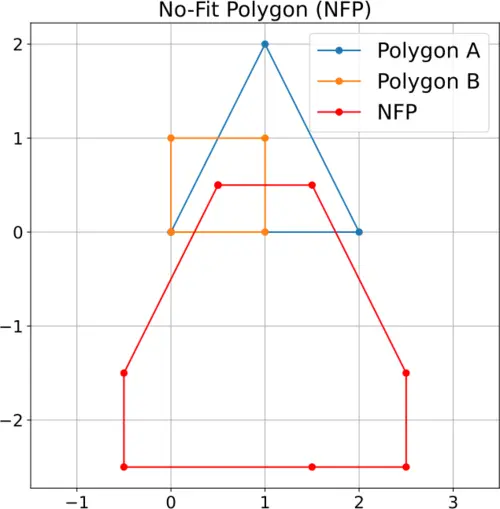
shows the output of the Python code. Polygons A and B are the input shapes; NFP is the no-fit polygon of the polygons A and B.
No-fit polygon for non-convex shapes
One approach to solving no-fit polygon for non-convex shapes is to breakdown the non-convex into multiple convex shapes. No-fit polygon is obtained by taking a union of no-fit polygon for convex shapes. This approach creates another problem of efficiently dividing a non-convex shape into multiple convex shapes.
In this article, we wil limit our discussion to 2d packing problem for convex shapes. Refer to an improved method for calculating the no-fit polygon, complete and robust no-fit polygon generation for the irregular stock cutting problem for advanced discussion of no-fit polygon
Genetic algorithm (GA) for 2d packing problem
See for a tutorial on genetic algorithm.
Algorithm: 2d packing problem using GA
- Generate a random population of chromosomes (encodings) for the GA. Each encoding contains
- Sequence of shapes. This is the order in which the shapes are placed on the metal sheet.
- Angle of each shape. This is angular position of the shapes on the metal sheet.
- For each chromosome, add each shape to the metal sheet in a sequential order. Use no-fit polygon to identify valid positions for each shape. Place the shape at a position that minimizes wastage. Store the best solution so far.
- Compute the fitness for each chromosome. Choose new parents for based on their fitness level.
- Crossover: Combine two parents to form offsprings by interchanging their ordering in the sequence and their angular position.
- Mutation: Swap order of two shapes in the sequence and/or their angular position.
- Go to step 2 or stop if their increase in fitness of the best chromosome stalls.
Deepnest: An opensource software for 2d packing
Deepnest is an open-source 2D nesting software used to arrange parts efficiently on a sheet for cutting processes like laser cutting, CNC routing, and plasma cutting. It helps reduce material waste by automatically placing shapes to make the best use of available space.
Features of Deepnest
- Supports SVG and DXF file formats
- Automatically nests parts to minimize material usage
- Merges overlapping lines to reduce cutting time
- Works offline on Windows, macOS, and Linux
- Offers control over spacing, rotation, and nesting precision
- Allows exporting of nested layouts in SVG or DXF format
Tutorial on Deepnest
See for a tutorial on Deepnest.
Author
Anurag Gupta is an M.S. graduate in Electrical and Computer Engineering from Cornell University. He also holds an M.Tech degree in Systems and Control Engineering and a B.Tech degree in Electrical Engineering from the Indian Institute of Technology, Bombay.
Comment
This policy contains information about your privacy. By posting, you are declaring that you understand this policy:
- Your name, rating, website address, town, country, state and comment will be publicly displayed if entered.
- Aside from the data entered into these form fields, other stored data about your comment will include:
- Your IP address (not displayed)
- The time/date of your submission (displayed)
- Your email address will not be shared. It is collected for only two reasons:
- Administrative purposes, should a need to contact you arise.
- To inform you of new comments, should you subscribe to receive notifications.
- A cookie may be set on your computer. This is used to remember your inputs. It will expire by itself.
This policy is subject to change at any time and without notice.
These terms and conditions contain rules about posting comments. By submitting a comment, you are declaring that you agree with these rules:
- Although the administrator will attempt to moderate comments, it is impossible for every comment to have been moderated at any given time.
- You acknowledge that all comments express the views and opinions of the original author and not those of the administrator.
- You agree not to post any material which is knowingly false, obscene, hateful, threatening, harassing or invasive of a person's privacy.
- The administrator has the right to edit, move or remove any comment for any reason and without notice.
Failure to comply with these rules may result in being banned from submitting further comments.
These terms and conditions are subject to change at any time and without notice.
Similar content





Past Comments