Minimizing Wastage of Foam Board while Building a RC Airplane
Most of us waste a lot of foam board while building a RC airplane. In this article, we will learn how to use Blender and Python to minimize wastage of foam board and build model airplanes like a professional.
Overview
The tutorial is split in two parts. utilizes Blender to trace individual parts of an airplane. In , uses the scripting feature in Blender to generate a JSON file required as an input to a 2D packing solver, named Sparrow. Finally, covers how to use the Sparrow solver to find a tight packing of parts on a foam board.
Tracing airplane parts in Blender
As I am not an expert in airplane design, I will use a ready-made plan of F22 fighter airplane from rcfoamfighters. There are numerous other websites offering a wide collection of free 2D plan for airplanes. As most of these plans are available as a static PDF file, it is difficult to interact with them using a Python script. So, first we need to trace the airplane parts in Blender.
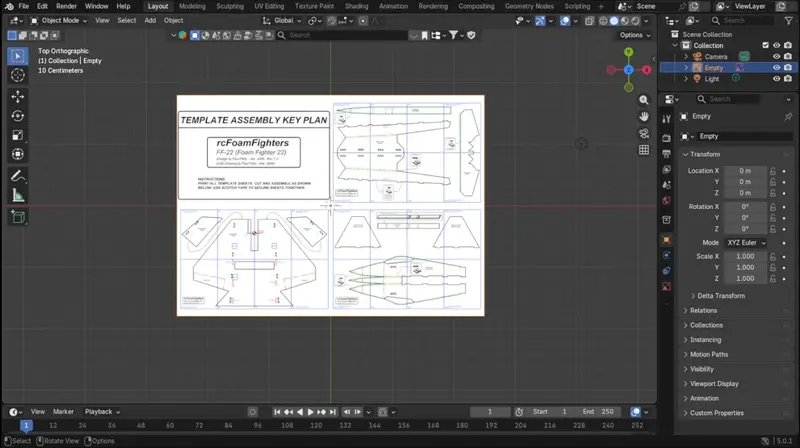
Start by importing the airplane plan as a reference image and scale it depending on the desired model size. Next, add multiple planes to trace each part. To ensure that the planes are not hiding the reference image, pull the reference image above the plane and decrease its opacity. Once you are satisfied with the setup, switch to Edit Mode and start using the Knife Tool for tracing. This step can take a long time depending on the complexity of the design. So, do take breaks to avoid eye strain.
Once the tracing is complete, hide the reference image to check the quality of the final drawing. To separate the parts from the underlying plane, select the corners of the plane and delete these vertices. Repeat this process for other parts of the airplane.
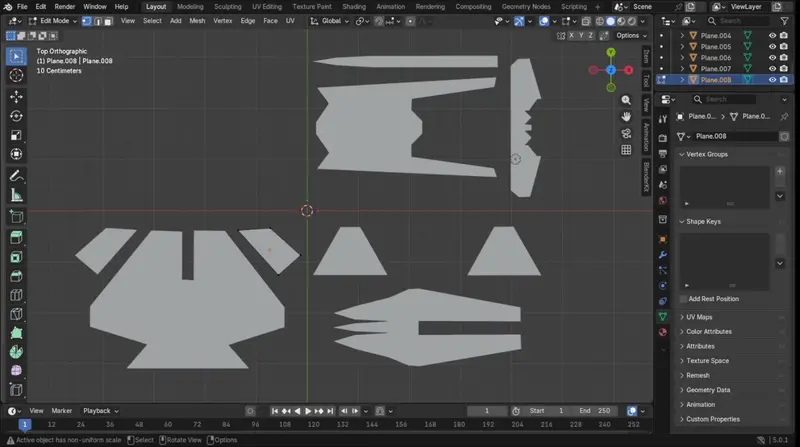
Once the design is ready, you can notice that the airplane parts are scattered all over the place. If we start cutting them without proper planning, we will end up wasting a lot of foam board. This brings us to the second part of the tutorial.
Scripting in Blender
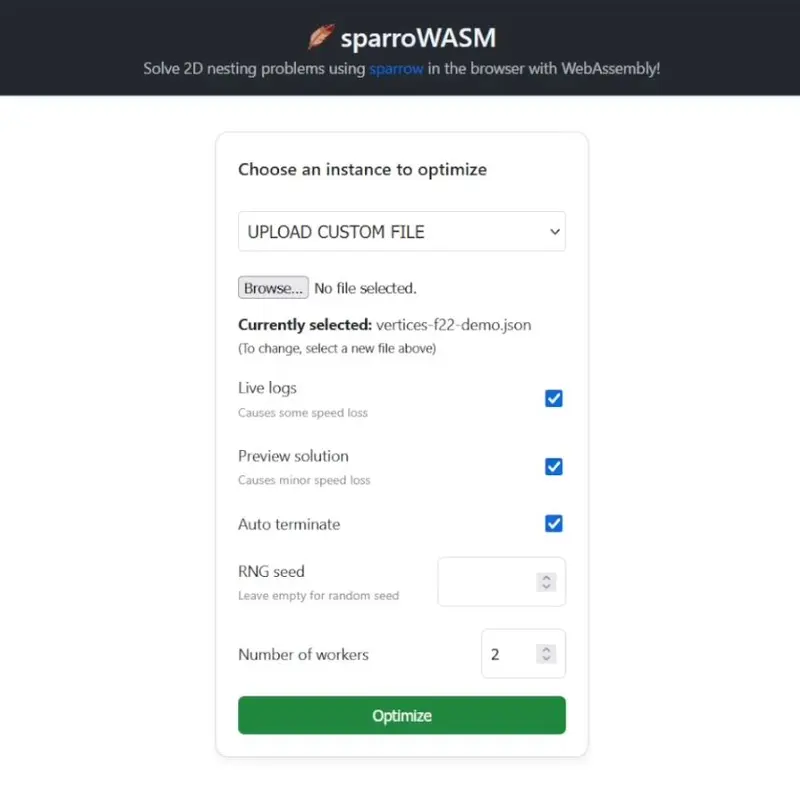
To find a tight packing of the airplane parts on a foam board is a challenging mathematical problem. Therefore, we can use the open source 2D packing solver named Sparrow. The best part of this solver is that its creators have also built a browser interface.
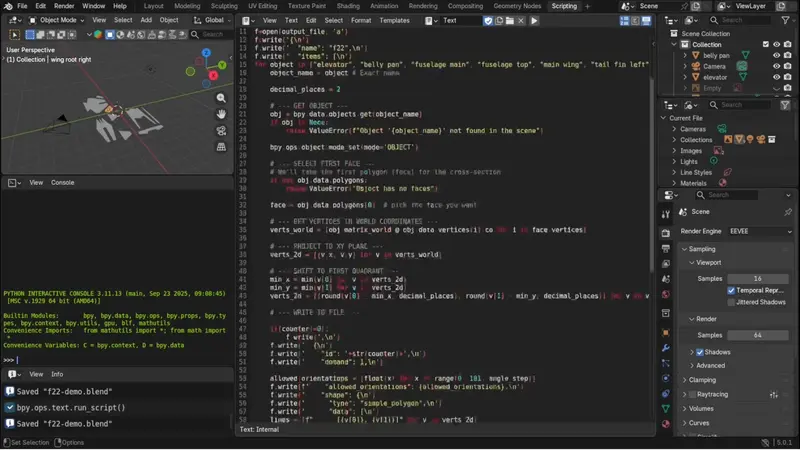
To interact with the Sparrow solver, we need to provide a JSON file describing each shape as an ordered list of vertices. As creating this structured file manually takes too much time, we can use the scripting feature in Blender.
import bpy

# --- CONFIGURE ---
counter = 0
output_file = "vertices-f22-demo.json"  # Full path
strip_height = 5
angle_step = 5  # chosen discretization value

with open(output_file, 'w') as f:
        pass  # opening in 'w' mode clears the file
f=open(output_file, 'a')
f.write('{\n')
f.write('  "name": "f22",\n')
f.write('  "items": [\n')
for object in ["elevator", "belly pan", "fuselage main", "fuselage top", "main wing", "tail fin left", "tail fin right", "wing root left", "wing root right"]:
    object_name = object # Exact name

    decimal_places = 2

    # --- GET OBJECT ---
    obj = bpy.data.objects.get(object_name)
    if obj is None:
        raise ValueError(f"Object '{object_name}' not found in the scene")

    bpy.ops.object.mode_set(mode='OBJECT')

    # --- SELECT FIRST FACE ---
    # We'll take the first polygon (face) for the cross-section
    if not obj.data.polygons:
        raise ValueError("Object has no faces")

    face = obj.data.polygons[0]  # pick the face you want

    # --- GET VERTICES IN WORLD COORDINATES ---
    verts_world = [obj.matrix_world @ obj.data.vertices[i].co for i in face.vertices]

    # --- PROJECT TO XY PLANE ---
    verts_2d = [(v.x, v.y) for v in verts_world]

    # --- SHIFT TO FIRST QUADRANT ---
    min_x = min(v[0] for v in verts_2d)
    min_y = min(v[1] for v in verts_2d)
    verts_2d = [(round(v[0] - min_x, decimal_places), round(v[1] - min_y, decimal_places)) for v in verts_2d]

    # --- WRITE TO FILE ---

    if(counter!=0):
        f.write(',\n')
    f.write('  {\n')
    f.write('    "id": '+str(counter)+',\n')
    f.write('    "demand": 1,\n')

    allowed_orientations = [float(x) for x in range(0, 181, angle_step)]
    f.write(f'    "allowed_orientations": {allowed_orientations},\n')
    f.write('    "shape": {\n')
    f.write('      "type": "simple_polygon",\n')
    f.write('      "data": [\n')
    lines = [f"      [{v[0]}, {v[1]}]" for v in verts_2d]
    f.write(",\n".join(lines) + "\n")
    f.write('      ]\n')
    f.write('    }\n')
    f.write("  }")

    counter=counter+1

f.write('],\n')
f.write( f'"strip_height":{strip_height}\n')
f.write('}')

print(f"Vertices saved as Python array to {output_file}")
I have already written a Python script to fetch different parts in Blender and generate a JSON file. Let's run this code and see the output file.
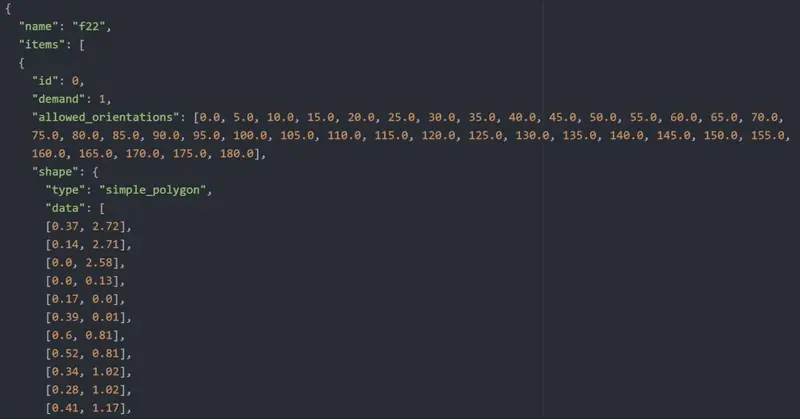
The file stores all the shapes in a format that the solver can understand. Each shape has a unique ID, a demand value specifying how many copies are required, allowed orientations during packing, and a list of vertices in the Cartesian coordinate system. At the end of the file, we specify the strip_height, which is the the width of the foam board. Using all this information, the Sparrow solver finds a packing that minimizes the total length of the used foam board for a fixed width.
Packing airplane parts on a foam board
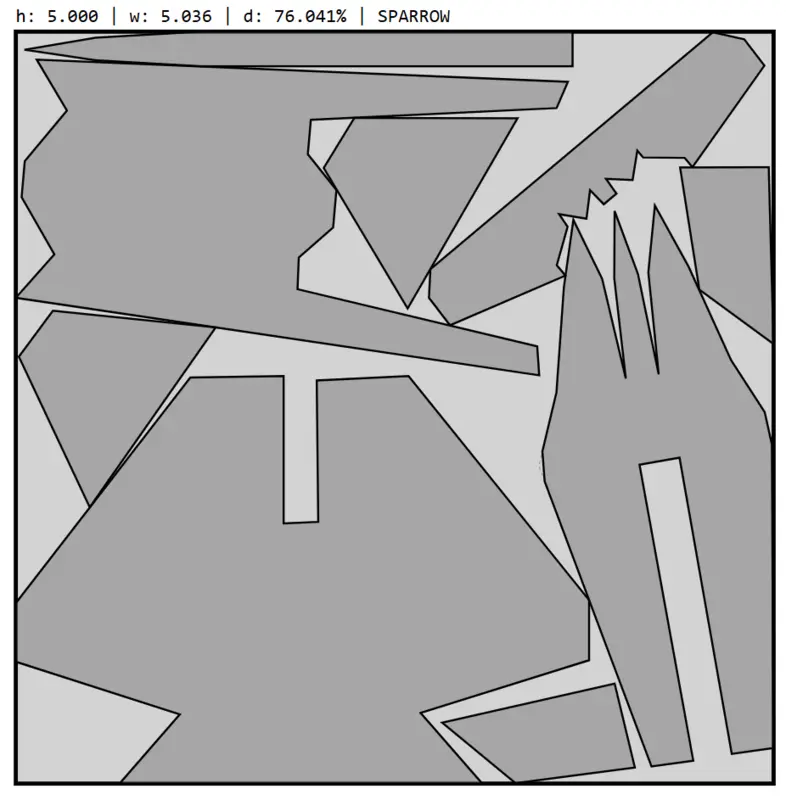
To find a tight packing, upload the JSON file in the browser interface for the Sparrow solver. After invoking the solver, it can take a while to obtain a good solution. Meanwhile, the interface displays the quality of the best solution found so far. If the improvements are becoming very small, there's an option to terminate the solver and get the best solution available at that point. The final packing will be available as a SVG file. This can either be printed and pasted on a foam board or fed to a laser cutting machine to cut out the parts.
Material used in this video
Download the Blender file with Python script used in this tutorial.
Tinkerer challenge
If you want to challenge yourself, try calling the Sparrow solver from the Python script and use the solution to re-draw the shapes in the Blender project. This will make your project independent of the availability of internet.
Author
Anurag Gupta is an M.S. graduate in Electrical and Computer Engineering from Cornell University. He also holds an M.Tech degree in Systems and Control Engineering and a B.Tech degree in Electrical Engineering from the Indian Institute of Technology, Bombay.
Comment
This policy contains information about your privacy. By posting, you are declaring that you understand this policy:
- Your name, rating, website address, town, country, state and comment will be publicly displayed if entered.
- Aside from the data entered into these form fields, other stored data about your comment will include:
- Your IP address (not displayed)
- The time/date of your submission (displayed)
- Your email address will not be shared. It is collected for only two reasons:
- Administrative purposes, should a need to contact you arise.
- To inform you of new comments, should you subscribe to receive notifications.
- A cookie may be set on your computer. This is used to remember your inputs. It will expire by itself.
This policy is subject to change at any time and without notice.
These terms and conditions contain rules about posting comments. By submitting a comment, you are declaring that you agree with these rules:
- Although the administrator will attempt to moderate comments, it is impossible for every comment to have been moderated at any given time.
- You acknowledge that all comments express the views and opinions of the original author and not those of the administrator.
- You agree not to post any material which is knowingly false, obscene, hateful, threatening, harassing or invasive of a person's privacy.
- The administrator has the right to edit, move or remove any comment for any reason and without notice.
Failure to comply with these rules may result in being banned from submitting further comments.
These terms and conditions are subject to change at any time and without notice.
Similar content






Past Comments