BSNL Postpaid - Porting Process, Timeline, Experience, and Breakdown of Billing Charges
Overview
The article covers porting of an existing Airtel mobile number to BSNL postpaid service. Common reasons for porting to BSNL are:
You live or you are traveling to remote areas where BSNL is the only option.
You are traveling to Jammu and Kashmir, or Ladakh and need a cheap postpaid service. Prepaid sim cards from other states do not work in this region.
You just need a cheap working sim number and do not want to pay expensive price for a private sector telecom companies' plan.
Porting process
For porting, visit any BSNL office with your identity card, and porting code. The idenitity card should contain an address in the circle you are applying for porting. If you are porting outside the circle, you would have to provide a guarantor's identity proof. If you are traveling for tourism, your hotel owner can be your guarantor. To generate porting code, send an SMS to 1900. The content of the SMS should be
PORT <YOUR-NUMBER>
UPC for mobile number porting
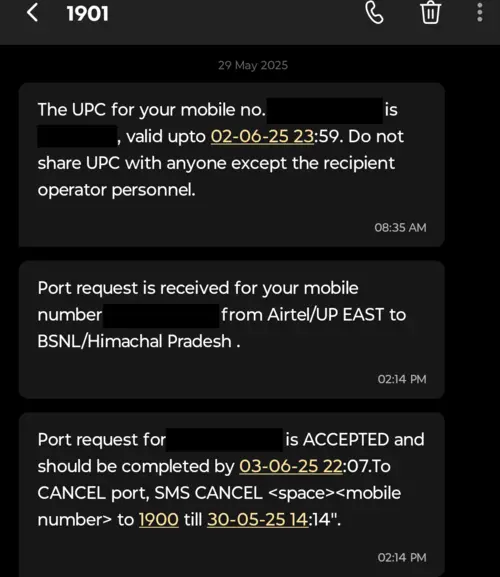
You should receive a UPC (unique porting code) from 1901 within a few seconds. Share this code with the BSNL officer for initiating port request. The Unique Porting Code (UPC) is valid for 4 days in most regions, but in Jammu & Kashmir and the North-eastern states, it is valid for 30 days.
Experience
I had initiated the porting process in Manali, Himachal Pradesh. Fortunately, people in mountain areas are humble and friendly. I was surprised to be assisted by such friendly officers. They helped me with every step of the process patiently. Also, I was in Manali during off-season, so there was less rush and I was the only customer at their customer service kiosk. This could be an another reason for the smooth porting process. I was charged Rs. 500 as security deposit and provided a receipt. Security deposit is mandatory for postpaid services as you pay the bill after every month's usage. They charged me Rs. 40 for the new sim card.
Timeline
29-May-2025: Generate UPC code for porting and visited the BSNL office in Manali. I was told by the officers that the process can take 2-3 working days. In some cases, it can take up to a week. For example, if you are porting from a different circle. After completing the paperwork, I received an SMS saying the porting process should be completed by 03-June-2025 22:07.
30-May-2025 - 02-June-2025: I left for Ladakh the day after initiating the porting process. So, my existing Airtel prepaid sim service was unavailable for use. I had to manually insert the new BSNL sim multiple times to check if it had started working.
03-June-2025: The porting process was complete around the exact time specified in the SMS.
The SMS service was unavailable for around 24-48 hours. The internet service on the new BSNL postpaid sim card should have started immediately but due to a setting issue, I could not use data for a few days. I change the preferred network to 4G but to no avail. I tried visiting the local BSNL office in Leh but the officers said the number is outside their circle and they can not help with the issue. I called the customer service representive in Manali. They couldn't figure out the problem either. From their dashboard, my number was completely active and working.
Finally, I asked another customer, waiting in the BSNL office, to let me check their APN (access point name) setting under bsnlnet. Turns out the default MNC was incorrect. I replaced the default MNC with 51 and saved it. After going back in the menu bsnlnet disappeared. This gave me a short panick attack. This time all I had to do was restart the phone. bsnlnet APN reappeared with the updated MNC.
Billing breakdown
First bill breakdown
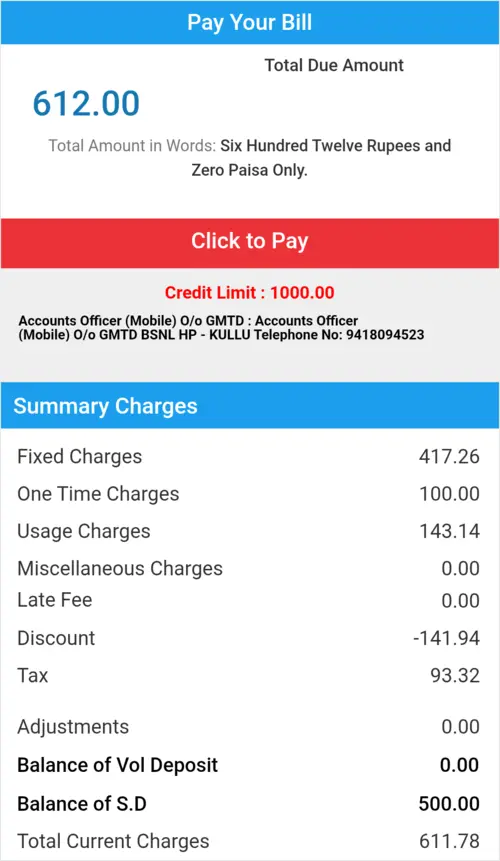
My first bill was generated on 03-July-2025. The bill amount was Rs. 612 even though I had opted for Rs. 199 plan. I could not download the bill on the BSNL app until the next day to understand the breakdown. I was charged from the date I had initiated the porting process even though the postpaid service did not activate until few days later. There was a fixed charge of Rs. 199 for the month of June and July. Plus, an additional pro-rated amount of Rs. 19.26 for the month of May.
I was also charged a one time fee of Rs. 100. I searched online and found this to be common for everyone although it feels sketchy to pay this additional Rs. 100 despite paying Rs. 40 for the new sim card.
I was charged Rs. 143.14 as usage fee despite free unlimited voice call and SMS. This was adjusted later in the bill as a discount of Rs. 141.94. So, around a rupee was still not compensated.
Finally, icing on the cake. The advertised plan price mentioned does not include GST. So, there was another 18% charge of Rs. 93.32.
Although, the breakdown clarified the Rs. 612, it did not justify charging for the month of July on a postpaid plan. I could have called BSNL customer care but realized it would be a waste of time. Anyways, I will be continuing with BSNL. If they double charge me for the month of July in the next billing cycle, I will contact their office.
Author
Anurag Gupta is an M.S. graduate in Electrical and Computer Engineering from Cornell University. He also holds an M.Tech degree in Systems and Control Engineering and a B.Tech degree in Electrical Engineering from the Indian Institute of Technology, Bombay.
These terms and conditions contain rules about posting comments. By submitting a comment, you are declaring that you agree with these rules:
Although the administrator will attempt to moderate comments, it is impossible for every comment to have been moderated at any given time.
You acknowledge that all comments express the views and opinions of the original author and not those of the administrator.
You agree not to post any material which is knowingly false, obscene, hateful, threatening, harassing or invasive of a person's privacy.
The administrator has the right to edit, move or remove any comment for any reason and without notice.
Failure to comply with these rules may result in being banned from submitting further comments.
These terms and conditions are subject to change at any time and without notice.
{"commentics_url":"\/\/soln.tech\/comments\/","page_id":1115,"enabled_country":false,"country_id":0,"enabled_state":false,"state_id":0,"enabled_upload":true,"maximum_upload_amount":3,"maximum_upload_size":5,"maximum_upload_total":5,"captcha":true,"captcha_url":"http:\/\/soln.tech\/comments\/frontend\/index.php?route=main\/form\/captcha&page_id=1115","cmtx_wait_for_comment":"cmtx_wait_for_comment","lang_error_file_num":"A maximum of %d files are allowed to be uploaded","lang_error_file_size":"Please upload files no bigger than %.1f MB in size","lang_error_file_total":"The total size of all files must be less than %.1f MB","lang_error_file_type":"Only image file types are allowed to be uploaded","lang_text_loading":"Loading ..","lang_placeholder_country":"Country","lang_placeholder_state":"State","lang_text_country_first":"Please select a country first","lang_button_submit":"Add Comment","lang_button_preview":"Preview","lang_button_remove":"Remove","lang_button_processing":"Please Wait.."}






Past Comments